Views#
Nova is using ErlyDTL to tempalte the views, that is an Erlang version of Django templating.
You can read more about Django templating here.
New view#
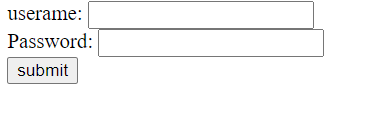
We want to create a simple view that have to input fields that will send in username and password to our service. In our directory src/views we will create a new file called login.dtl. In that file we will add this html code.
<html>
<body>
  <div>
    <form action="/" method="post" id="nameform">
      <label for="username">userame:</label>
      <input type="text" id="username" name="username"><br>
      <label for="password">Password:</label>
      <input type="password" id="password" name="password"><br>
      <input type="submit" value="submit">
    </form>
  </div>
</body>
</html>
As you can see in this html we will send a post to the endpoint /login.
Controller#
We will now modify our controller so we can view this html.
In our application we have a controller that is in src/controllers the file is called my_first_nova_contrller.erl.
It looks like this:
-module(my_first_nova_main_controller).
-export([
         index/1
        ]).

index(_Req) ->
    {ok, [{message, "Hello world!"}]}.
What this does is send "Hello world!" to the view that we did see when we went to localhost:8080. Now we want to add the function that we added in the routing section.
The function we want to add is login/1.
-module(my_first_nova_main_controller).
-export([
         index/1,
         login/1
        ]).

index(_Req) ->
    {ok, [{message, "Hello world!"}]}.

login(_Req) ->
    {ok, [], #{view => login}}.
What this return tuple will tell Nova is that we want a view and it is named login, Nova will check after the view and show it if we go to localhost:8080/login. And because we added the route before in the routing file we will now connect the view.